Good session – or
not? Clear in 10 seconds.
You get home from the ride, import your file – and instantly know whether that was a good session and how fit you are right now. No account, no subscription, no server.
Crisp sweet-spot work at IF 0.89. Your heart rate held steady across the full distance – clean aerobic base, no drift. Easy spin tomorrow.
Endurance Debrief answers exactly what matters.
No map, no segments, no social feed. Just the micro level of today's session and the macro level of your fitness over weeks.
Was today's session good?
Zone analysis, Normalized Power, TSS, aerobic decoupling – plus a two-sentence coach note.
How is my fitness trending?
CTL, ATL and TSB in the Performance Management Chart – your form at a glance.
What your debrief actually looks like.
No rendered mockups – real screenshots from Endurance Debrief on iPhone. As of version 2.0 the same app runs natively on iPad, too.
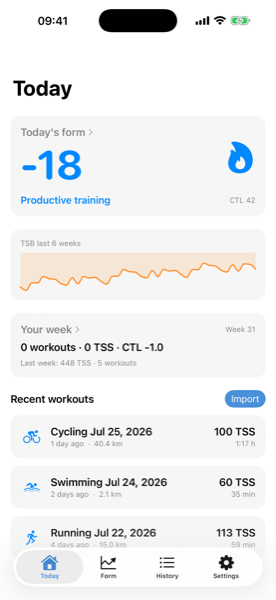
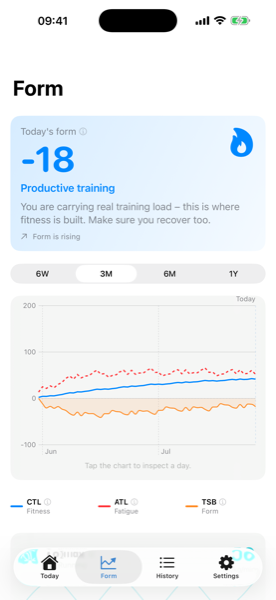
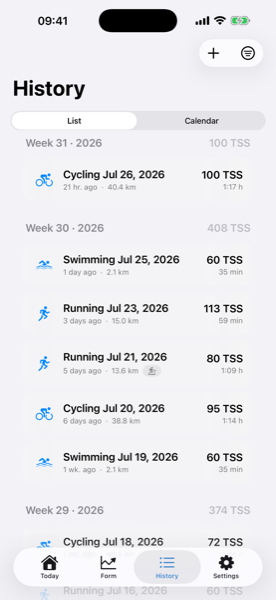
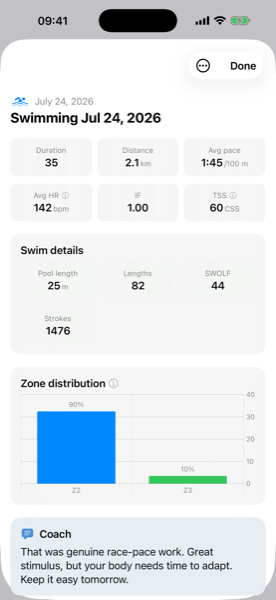
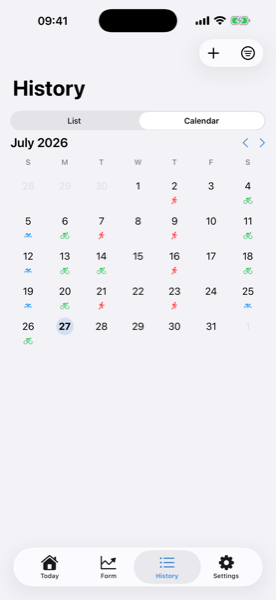
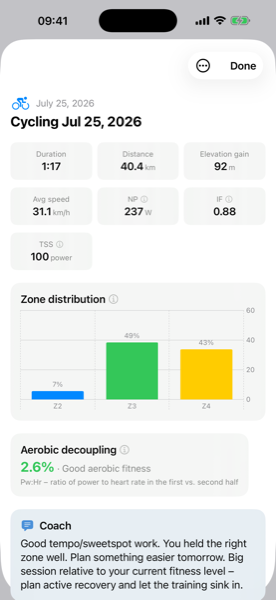
From raw file to plain language in three steps.
No setup marathon, no account. Keep using the device you already have – Endurance Debrief takes over only afterwards.
Record
Ride or run like always – with Garmin, Wahoo, Apple Watch, Coros & co. The app records nothing and never runs in the background.
Import
Share the .fit, .tcx or .gpx file via "Share → Debrief", Files or AirDrop. Or turn on Apple Health import – new sessions then arrive automatically.
Read your debrief
In about 10 seconds: zones, NP, IF, TSS, aerobic decoupling and a two-sentence coach note – and your fitness curve grows with every session.
The same metrics as the expensive analysis tools – without the subscription.
Every metric is computed locally from your file. Power-based if you have a power meter – otherwise from heart rate or pace, always clearly labelled.
Normalized Power
The effort-adjusted wattage of your ride – 30-second smoothing instead of a plain average.
Intensity Factor
NP relative to your FTP. Tells you to one decimal how hard the session really was.
Training Stress Score
One number for total load – power-, heart-rate- or pace-based, depending on your data.
Aerobic Decoupling
Does your heart rate drift in the second half? The most honest indicator of aerobic fitness.
CTL / ATL / TSB
Chronic load, acute load and their balance – exponentially weighted over 42 and 7 days.
Swimming
Pool sessions from your FIT file: pace per 100 m, SWOLF and a swim TSS from your CSS – feeding the same fitness curve as cycling and running.
Coach note
Rule-based feedback in plain language: where the session sits, the standout metric, what to do tomorrow.
Your training data never leaves your iPhone.
No backend
All calculations run on the device. There's no server that could know anything.
No login
No email, no password, no account. Install and go.
No connection
Works in airplane mode. Endurance Debrief doesn't even ask for network access.
No tracking
No analytics, no SDKs, no ad IDs. Nothing is measured.
Version 2.0 is here – now on iPad, too.
Endurance Debrief is on the App Store and right now it costs you $0.00 / €0.00. No subscription, ever – it is a one-time purchase that will go back to $2.99 later. Download it now and every future update comes at no extra cost.
Left out – on purpose
- ✕ Maps & route display
- ✕ Live tracking & recording
- ✕ Social feed, likes, leaderboards
- ✕ Training plans & workout suggestions
- ✕ Cloud sync, accounts, servers
- ✕ Subscription model
Looking for beta testers
The app gets better from real training data, not from a desk. Almost every bug found so far came from a file I would never have thought of – a pool swim without any GPS, for instance. If you record rides, runs or swims and want to see new features before everyone else: send me a short email and I'll invite you to the beta via TestFlight.
testpilot@endurancedebrief.appThree formats. Share → Debrief.
Import straight from Files, AirDrop or "Open in…": Garmin, Wahoo, Sigma, Hammerhead, Apple Watch, Polar, Coros, Suunto. You export the file from your provider's web portal – with Strava & Garmin that's the only way, not the phone app (the app shows you how). Batch import for your entire history, so the fitness curve is right from day one.
Or: new sessions arrive on their own.
Garmin, Wahoo, Strava and the Apple Watch already write your workouts into Apple Health. Turn on Health import in Settings and Debrief pulls in your cycling, running and swimming workouts automatically – the full history once, then every new session every time the app starts. No export, no detour via a website. You can narrow the import down by date range and sport. Swimming comes from Health as of version 2.0 – set the sport selection to “All sports” once, then tap “Re-import Health workouts”; only then are past swims picked up as well.
The file stays the path with the most data depth (power, NP). Add the original file later for a session that already came in from Health and, as of version 2.0, it replaces that Health import – not a duplicate, the same session with the fuller data. Apple Health is the convenient path for everything after that – and the best part: reading from Health happens entirely on your iPhone. No server, no account, no tracking.
Everything stays local on your iPhone.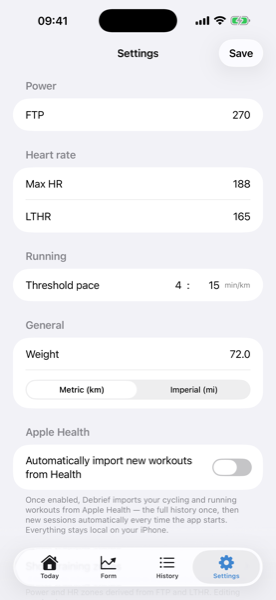
What you'll want to know first.
Do I need a power meter?
No. With a power meter, Endurance Debrief computes power-based (NP, IF, TSS). Without one it uses heart rate or pace – the method is always clearly labelled, so you know what a number is based on.
Which files and devices are supported?
The standard formats .fit, .tcx and .gpx – so anything from Garmin, Wahoo, Apple Watch, Coros, Polar, Suunto, Sigma or Hammerhead. Import via "Share → Debrief", Files or AirDrop, single or in a batch.
How do my activities get into the app?
Two ways. The convenient one: turn on Apple Health import in Settings – Debrief pulls your cycling, running and swimming workouts from Health automatically, the full history once and then every new session every time the app starts. It all runs entirely on the iPhone. For maximum data depth (power, NP): via the activity file. On Strava and Garmin you export it from their website – the phone app has no file export: Strava → "···" → "Export Original"; Garmin Connect → gear icon → "Export Original". Then open it via "Share → Debrief". The app walks you through both ways step by step.
Does my data leave the iPhone?
Never. All calculations run on-device – no account, no server, no tracking, no ad SDKs. The app works in airplane mode, and on the App Store it lists "Data Not Collected".
Which sports does Endurance Debrief support?
Cycling, running and swimming. Cycling computes via power or heart rate, running via pace (rTSS) or heart rate (hrTSS), swimming via your CSS (Critical Swim Speed) as sTSS – without a CSS on file the swim TSS is estimated from heart rate. Treadmill runs are marked as such and count fully as running. The sport is detected automatically and can be corrected on import. For pool swims, export the FIT file – a GPX contains no measurement data for pool swimming.
What does the app cost – is there a subscription?
Right now, nothing at all – Endurance Debrief is free on the App Store ($0.00 / €0.00). There is no subscription and never will be: it is a one-time purchase that will go back to $2.99 later. No in-app purchases, no ads. Download it once, keep it – every update included.
Import. Read. Know what's what in 10 seconds.
Watts, not followers. Sessions, not feeds. Your data stays with you.